
Lesson 2: eBPF Kprobe Programming
Objective: Monitor the execution of the unlink function using eBPF technology
A PowerPoint presentation is needed to outline the basic approach for writing an eBPF-based kprobe program.
1. Introduction to Kprobe Technology
Let's briefly introduce the theoretical knowledge. Once we understand the basics, we'll dive into practical implementation.
2. Coding Practice
2.1 Finding the Trace Point: Locating the Kernel Function for unlink
The unlink system call is used to delete a file.
Reference: https://elixir.bootlin.com/linux/v6.14.5/source/fs/namei.c#L4553
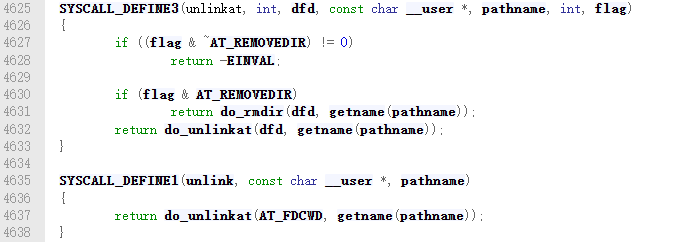
From the code above, we can see that the unlink system call internally invokes the do_unlinkat kernel function. This function accepts two parameters: dfd (file descriptor) and name (pointer to filename structure).
2.2 The BPF_KPROBE Macro
Documentation:
https://docs.ebpf.io/ebpf-library/libbpf/ebpf/BPF_KPROBE/
Before using the macro:
Developers had to use the PT_REGS_PARAM macro to extract parameters from the context and manually cast them to their actual types.
Reference: http://docs.ebpf.io/ebpf-library/libbpf/ebpf/PT_REGS_PARM/
After using the macro:
The BPF_KPROBE macro allows you to write the parameter list directly in your program, and the macro handles the parameter conversion for you. This makes reading and writing kprobes much easier.
Benefits: Makes writing eBPF kprobe programs significantly easier.
Usage: Define the function prototype beforehand, including the number of function parameters, parameter types, return value, etc.
2.3 The BPF_CORE_READ Macro
Documentation:
https://docs.ebpf.io/ebpf-library/libbpf/ebpf/BPF_CORE_READ/
Before using the macro:
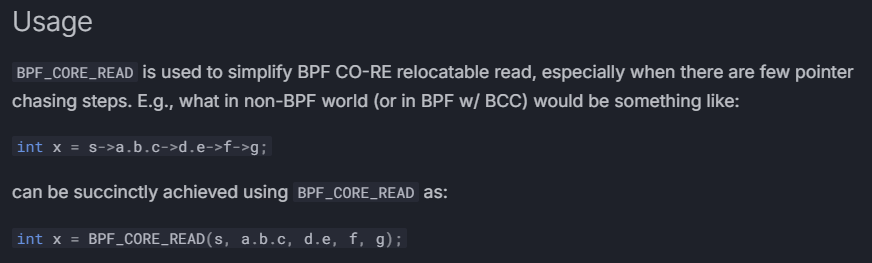
After using the macro:
Simplifies the operation of reading multi-level struct members, allowing programmers to focus more on writing code.